반응형
python SFTP
1. Pycharm Terminal
지원 Python 버전
2020.11.27일 확인 paramiko 현재 Python 2.7, 3.4버전 이상 지원
Installing — Paramiko documentation
On Linux, or on other platforms with older versions of pip: you’ll need a C build toolchain, plus development headers for Python, OpenSSL and libffi. Again, see Cryptography’s install docs; these requirements may occasionally change. Warning If you go
www.paramiko.org
암호화는 SSH 프로토콜을 구현하는 데 필요한 저수준 (C 기반) 암호화 알고리즘을 제공합니다.
설치 명령어 : Terminal 에서 python -m pip install paramiko
- Window 의 경의 CMD의 Python Project경로에서
- Pycharm Terminal의 경우 하기 이미지 집중
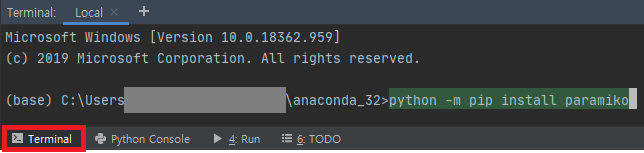
2. Pycharm Settings
- 1. file -> Settings

- 2. Project -> Interpreter

- 3. Available Packges

3. Source
SFTP Connection
import paramiko
#paramiko 현재 Python 2.7, 3.4버전 이상 지원

#server 주소
host = [hostName]

#22 : SSH
port = 22

#userName 외부 유출 염려 암호화된 id 사용
id = [ID]

#password 외부 유출 염려 암호화된 id 사용
pwd = [PWD]

#client 경로
localPath   = [localPath]

#server 경로
serverPath  = [serverPath]

#파일명
fileName    = [fileName]

paramiko.util.log_to_file(localPath + '/sftp.log')

#접속
transport = paramiko.transport.Transport(host,port)
SFTP Upload
#다운로드
sftp.get(serverPath + fileName, localPath + fileName + 'test')
SFTP Download
# 업로드
sftp.put(localPath + fileName, serverPath + fileName)
Full Source
import paramiko
#paramiko 현재 Python 2.7, 3.4버전 이상 지원

#server 주소
host = [IP]

#22 : SSH
port = 22

#userName
id = [ID]

#password
pwd = [PWD]

#client 경로
localPath   = [LocalPath]

#server 경로
serverPath  = [ServerPath]

#파일명
fileName    = [fileName]

paramiko.util.log_to_file(localPath + '/sftp.log')

#접속
transport = paramiko.transport.Transport(host,port)

#소켓 연결 확인
try:
    #연결 대상 정보 확인 host, port
    print(transport.getpeername())

    #Connection
    #각 상황에 맞는 오류
    # id, pwd 의 경우 Authentication failed.
    # host 의 경우 paramiko.ssh_exception.SSHException
    transport.connect(username=id, password=pwd)

    #열린 연결을 통해 sftp 클라이언트 채널 생성 변수 transport 이미 인증 된 연결
    #버전 1.15 에서 변경: window_size 및 max_packet_size인수가 추가되었습니다.
    #window_size (int) – optional window size for the SFTPClient session.
    #max_packet_size (int) – optional max packet size for the SFTPClient session..
    sftp = paramiko.SFTPClient.from_transport(transport)

    # 업로드
    sftp.put(localPath + fileName, serverPath + fileName)

    #다운로드
    sftp.get(serverPath + fileName, localPath + fileName + 'test')

finally:
    sftp.close()
    transport.close()
반응형
'파이썬 > 기타' 카테고리의 다른 글
| strftime (0) | 2023.03.20 |
|---|---|
| 제3차 자동차정책기본계획 (0) | 2022.09.28 |
| 중국 관련 2011년 수출입 항목 (0) | 2022.07.01 |
| OpenSea 메타데이터 표준 (0) | 2022.05.09 |
| 비트코인 DAO (0) | 2022.03.23 |


